
Admin Dashboard
Sign in at /admin/login, and you land on the dashboard — your store's vital signs on one screen.
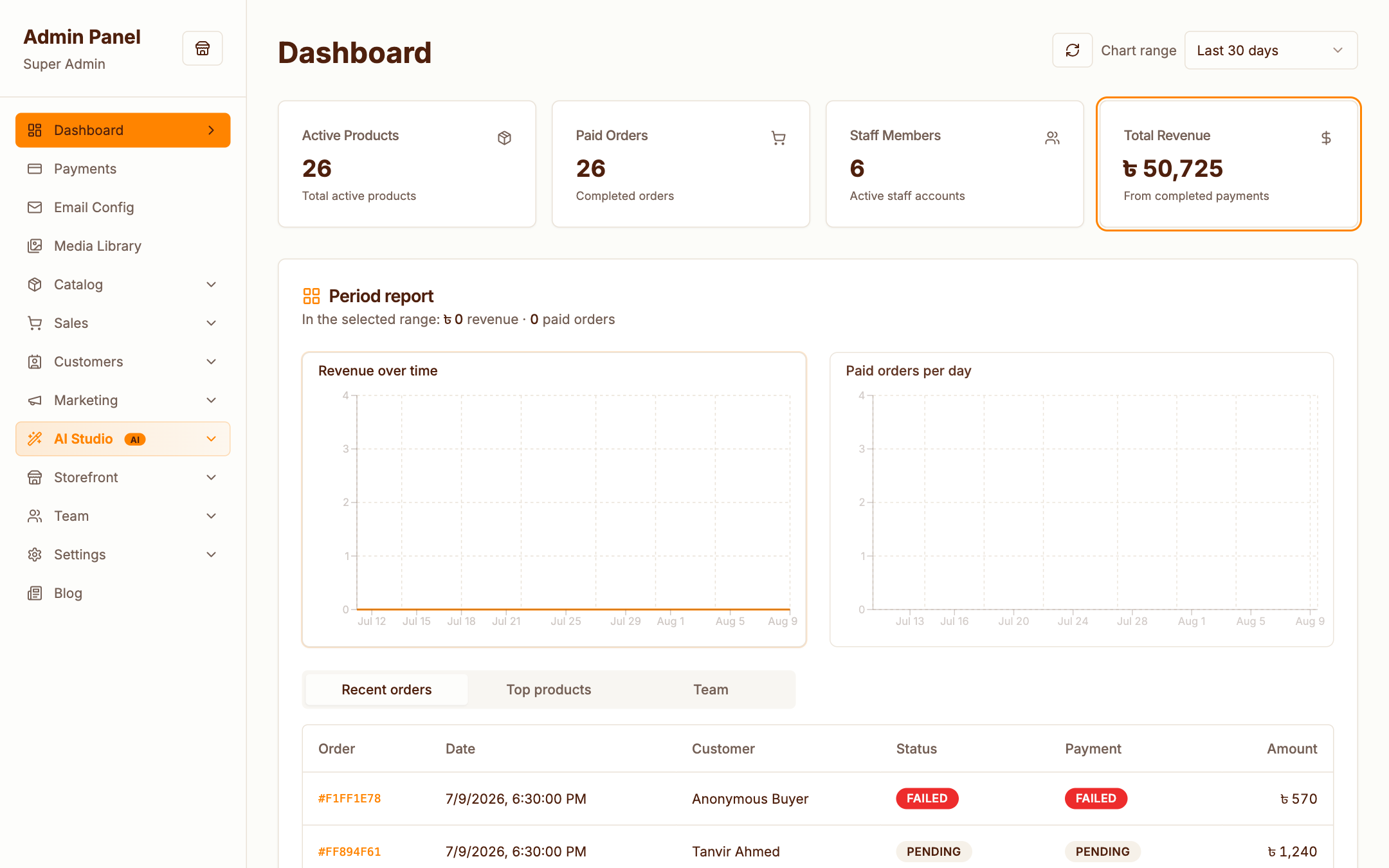
What you see
- Stat cards — active products, paid orders, staff members and total revenue from completed payments
- Period report — revenue over time and paid orders per day, with a selectable chart range (last 7 / 30 / 90 days)
- Recent orders — the latest orders with live status and payment badges; click any order number to jump to its detail page
- Top products & Team tabs — best sellers in the period, and who's on your team
Navigation
The left sidebar is organised the way you work:
| Section | Contains |
|---|---|
| Payments | Payment overview |
| Email Config | SMTP & sender settings |
| Media Library | All uploaded assets |
| Catalog | Products, categories, brands, attributes |
| Sales | Orders, courier |
| Customers | Customer list, reviews |
| Marketing | Campaigns, subscribers, segments, promotions, popups |
| AI Studio | Image & video generation |
| Storefront | Hero slides, funnels, static pages |
| Team | Staff, roles |
| Settings | Business, payments, email templates, storage, AI, tracking |
| Blog | Posts |
What each staff member sees depends on their role & permissions — a catalog editor won't see Settings at all.